
While conducting research on how to create a personal learning environment, I discovered Symbaloo, a personal knowledge management system. I was ecstatic because I wanted a method to organize and keep track of the free online courses I will be taking over the next 12 months to obtain my non-degreed liberal arts education. In Personal Learning Environment: Choose and Keep Track of Your Online Courses, I presented the nine free online courses that I plan to take over the next year as I work through my non-degreed liberal arts education.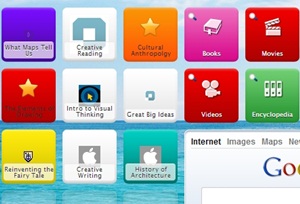
Instead of going to various websites to take my courses, I wanted to have them in one place, and Symbaloo allows me to do that, and you can also make Symbaloo your homepage if you so choose. Additionally, if there are books, articles, tweets, entries from encyclopedias that will also aid in your ongoing learning, Symbaloo allows you to search from the dashboard. It also comes with many tiles already in place. For instance, if I want to search for books on my topic of interest, all I have to do is click on the book tile and I am either able to search Amazon or Abebooks, and if I am interested in searching the encyclopedia, I click on the appropriate tile and I am able to choose which encyclopedia to search. You can link to videos and movies – the possibilities are endless.
Creating a Personal Learning Environment
- Review Personal Learning Environment: Choose and Keep Track of Your Online Courses to choose your free online courses. Record the names of the courses, their links and descriptions in a document.
- Create your free Symbaloo Account.
- Evaluate the tiles that are loaded and decide which ones you will use, and delete the ones that will distract you.
- Create a tile for each of the courses that you are taking to keep your skills sharp. To do so, click on a blank tile, add the website URL for the course and the name of the course, then click save. Repeat the process until you have added all the courses.
- If you are taking courses with a partner, you can share you webmix, which is all the options on your personal knowledge management system in Symbaloo.
- Experiment with the many offerings from Symbaloo to enhance your learning experience.
Completing Your Courses
You have created your personal learning environment on Symbaloo, what next? You have done the easy part, now you have to commit to completing your course. Use time management tools such as Wedoist and Workflowy to map the tasks with timelines attached that you have to perform to achieve your learning goals. After you have mapped out your tasks using the time management tools, schedule them into your calendar to ensure that you complete them. To take a class, click on the link from your Synbaloo dashboard.
What step did I miss in the process? Please let me know your thoughts in the comments section below. Liked this post? Share it and subscribe to my RSS feed and get loads more!
Author Bio: Avil Beckford, an expert interviewer, entrepreneur and published author is passionate about books and professional development, and that's why she founded The Invisible Mentor and the Virtual Literary World Tour to give you your ideal mentors virtually in the palm of your hands by offering book reviews and book summaries, biographies of wise people and interviews of successful people.
Book links are affiliate links.
Note: Netvibes is another personal learning environment that you can explore on your own. I have signed up for a free account but haven't played around with it as yet.